1. The Internet: Client ↔ Server
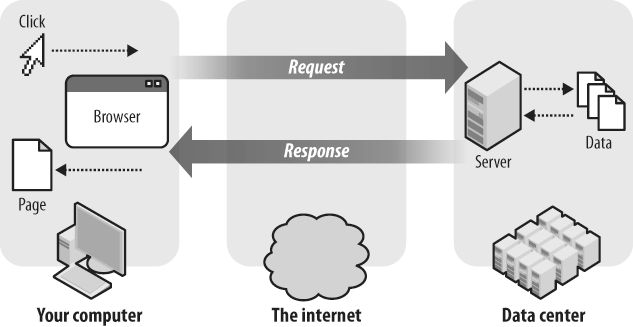
Every website on earth works the same fundamental way: a client asks for something, and a server answers. That's it. Everything else — Django, databases, templates — is detail on top of this single conversation.
The client is your browser (Chrome, Firefox, Safari). The server is just another computer — usually in a data center somewhere — running software that knows how to respond to web requests. Django is that software.
When you type rujalbaniya.com in your browser, your browser looks up the IP address
of that server, opens a connection, and says "Give me the home page."
The server runs its code (Django in our case), builds the HTML, and sends it back.
Your browser renders the HTML as a visual page. Done.
2. How HTTP Works
The language clients and servers speak is called HTTP (HyperText Transfer Protocol). Every request has a method and a path. Every response has a status code and a body.
| Method | What it means | Example |
|---|---|---|
GET | Fetch a page or resource | Load a blog post |
POST | Send data to the server | Submit a form |
PUT / PATCH | Update an existing resource | Edit a profile |
DELETE | Remove a resource | Delete a comment |
| Status code | Meaning |
|---|---|
200 OK | Everything worked, here's your content |
301 / 302 | Redirect — go here instead |
404 Not Found | That page doesn't exist |
500 Server Error | Something broke on our end |
Django's job is to look at the incoming request — its method, path, and any data it carries — and decide what HTML (or JSON, or redirect) to send back.
3. What Django Does
Django is a Python web framework. A framework is code that handles the boring, repetitive infrastructure so you can focus on your actual product. Without a framework, building a website means manually parsing HTTP requests, writing SQL queries with sanitization, building forms with CSRF protection, handling sessions... thousands of lines before you write a single line of business logic.
Django handles all of that. You write Python functions that receive requests and return responses. Django handles everything in between.
4. The MTV Pattern
Django organises code around a pattern called MTV: Model, Template, View. You may have heard of MVC (Model-View-Controller) from other frameworks — Django's version is the same idea, just with different names.
Think of it this way:
- Model — defines your data and talks to the database
- Template — the HTML skeleton with placeholders for dynamic data
- View — the brain: fetches data from the Model, passes it to the Template, returns the result
The View is not what the user sees. The Template is what the user sees. The View is the logic that decides which template to show and what data to put in it.
5. URLs — The Router
The first thing Django does with every request is figure out which view to call.
It does this by matching the URL path against a list of patterns defined in urls.py.
Here's what a real urls.py looks like:
# myproject/urls.py
from django.urls import path
from myapp import views

urlpatterns = [
    path('',                     views.home,         name='home'),
    path('about/',               views.about,        name='about'),
    path('blog/',                views.blog_list,    name='blog_list'),
    path('blog/<int:post_id>/', views.blog_detail,  name='blog_detail'),
]
The angle-bracket syntax — <int:post_id> — captures a part of the URL and
passes it to your view as a named Python argument. So /blog/42/
calls blog_detail(request, post_id=42).
name= argument).
This lets you write {% verbatim %}{% url 'blog_detail' post.id %}{% endverbatim %}
in templates instead of hardcoding paths — so if you ever change a URL, you only change it in one place.
6. Views — The Logic
A view is a Python function (or class) that receives an HTTP request object and returns an HTTP response. That's the complete definition. Everything in between — database queries, business logic, template rendering — is your code.
# myapp/views.py
from django.shortcuts import render, get_object_or_404
from .models import Post

def blog_list(request):
    # 1. Fetch data from the database
    posts = Post.objects.filter(is_published=True).order_by('-published_at')

    # 2. Pass it to a template — Django renders and returns HTML
    return render(request, 'blog/list.html', {'posts': posts})


def blog_detail(request, post_id):
    # get_object_or_404 returns the post, or a 404 page if it doesn't exist
    post = get_object_or_404(Post, id=post_id, is_published=True)
    return render(request, 'blog/detail.html', {'post': post})
The render() shortcut does three things in one call: takes the request, finds your
template file, passes the context dictionary into it, and returns the rendered HTML
as a HttpResponse.
Function-Based vs Class-Based Views
Django offers two styles. Function-Based Views (FBVs) are plain Python functions — straightforward, easy to read, great for beginners. Class-Based Views (CBVs) are classes that inherit from Django generics, reducing boilerplate for common patterns (list pages, detail pages, forms).
# The same blog list as a Class-Based View
from django.views.generic import ListView
from .models import Post

class BlogListView(ListView):
    model = Post
    template_name = 'blog/list.html'
    context_object_name = 'posts'

    def get_queryset(self):
return Post.objects.filter(is_published=True)7. Templates — The HTML
Templates are HTML files with special Django tags that get replaced with real data before being sent to the browser. The template language is intentionally simple — it's not Python, and that's on purpose.
<!-- templates/blog/list.html -->
<!DOCTYPE html>
<html>
<head>
    <title>Blog</title>
</head>
<body>

  <h1>All Posts</h1>

  {% verbatim %}{% for post in posts %}{% endverbatim %}
    <article>
      <h2><a href="{% verbatim %}{% url 'blog_detail' post.id %}{% endverbatim %}">{{ post.title }}</a></h2>
      <p>{{ post.excerpt }}</p>
      <time>{{ post.published_at|date:"M j, Y" }}</time>
    </article>
  {% verbatim %}{% empty %}{% endverbatim %}
    <p>No posts yet.</p>
  {% verbatim %}{% endfor %}{% endverbatim %}

</body>
</html>
Template Inheritance — The Most Important Feature
Copying the same <head>, navbar, and footer into every template would be
terrible. Django solves this with template inheritance. You define a
base layout with named blocks, then child templates fill in only what's different.
<!-- templates/base.html -->
<!DOCTYPE html>
<html>
<head>
    <title>{% verbatim %}{% block title %}My Site{% endblock %}{% endverbatim %}</title>
    <link rel="stylesheet" href="{% verbatim %}{% static 'styles.css' %}{% endverbatim %}">
</head>
<body>
    <nav><a href="/">Home</a></nav>

    {% verbatim %}{% block content %}{% endverbatim %}
    <!-- child templates fill this in -->
    {% verbatim %}{% endblock %}{% endverbatim %}

    <footer>© 2025</footer>
</body>
</html>

<!-- templates/blog/detail.html -->
{% verbatim %}{% extends 'base.html' %}

{% block title %}{{ post.title }}{% endblock %}

{% block content %}{% endverbatim %}
  <h1>{{ post.title }}</h1>
  <div>{{ post.body|safe }}</div>
{% verbatim %}{% endblock %}{% endverbatim %}
Child templates only define what's different. The navbar, footer, and
<head> are written once in base.html and automatically
included everywhere.
8. Models — The Database
A Django model is a Python class that maps directly to a database table. Each class attribute becomes a column. You never write SQL by hand — Django generates it from your Python classes.
# myapp/models.py
from django.db import models
from django.contrib.auth.models import User

class Category(models.Model):
    name = models.CharField(max_length=100)
    slug = models.SlugField(unique=True)

    def __str__(self):
        return self.name


class Post(models.Model):
    title        = models.CharField(max_length=200)
    slug         = models.SlugField(unique=True)
    body         = models.TextField()
    excerpt      = models.TextField(blank=True)
    author       = models.ForeignKey(User, on_delete=models.CASCADE)
    category     = models.ForeignKey(Category, null=True, on_delete=models.SET_NULL)
    published_at = models.DateTimeField(null=True, blank=True)
    is_published = models.BooleanField(default=False)
    created_at   = models.DateTimeField(auto_now_add=True)

    class Meta:
        ordering = ['-published_at']

    def __str__(self):
        return self.title
Common Field Types
| Field | Use it for |
|---|---|
CharField(max_length=N) | Short strings — titles, names |
TextField() | Long text — body content, descriptions |
IntegerField() | Whole numbers |
BooleanField() | True / False |
DateTimeField() | Date + time |
ImageField() | File upload path for images |
ForeignKey(Model) | Many-to-one relationship |
ManyToManyField(Model) | Many-to-many (e.g. tags) |
Querying the Database — The ORM
Django's ORM (Object-Relational Mapper) lets you query the database using Python instead of SQL.
Every model has a built-in objects manager:
# All published posts
posts = Post.objects.filter(is_published=True)

# Most recent 5 posts
recent = Post.objects.filter(is_published=True).order_by('-published_at')[:5]

# Single post by slug (raises 404 if not found)
post = get_object_or_404(Post, slug='why-django')

# Create a new post
Post.objects.create(title='Hello', body='World', author=request.user)

# Update
Post.objects.filter(id=1).update(is_published=True)

# Delete
Post.objects.filter(is_published=False).delete()
Migrations — Keeping DB in Sync
Every time you change a model, you run two commands:
python manage.py makemigrationspython manage.py migrate9. admin.py — Free Control Panel
One of Django's most powerful features ships with zero effort: the automatic admin interface.
Register your models in admin.py, and Django generates a full CRUD interface — create,
read, update, delete — with search, filters, and pagination included.
# myapp/admin.py
from django.contrib import admin
from .models import Post, Category

# Simple registration
admin.site.register(Category)

# Customised registration
@admin.register(Post)
class PostAdmin(admin.ModelAdmin):
    list_display   = ['title', 'author', 'category', 'is_published', 'published_at']
    list_filter    = ['is_published', 'category']
    search_fields  = ['title', 'body']
    prepopulated_fields = {'slug': ('title',)}
    date_hierarchy = 'published_at'
    ordering       = ['-published_at']
Access it at /admin/ after creating a superuser:
python manage.py createsuperuser10. settings.py & Other Important Files
A fresh Django project generates a handful of files. Here's what each one does:
| File | What it does |
|---|---|
settings.py |
Master config: database, installed apps, static files, secret key, allowed hosts, templates, middleware |
urls.py |
Root URL configuration — maps paths to views (usually includes app-level urls.py files) |
wsgi.py / asgi.py |
Entry points for production servers (gunicorn / uvicorn). You rarely touch these |
manage.py |
CLI tool for runserver, makemigrations, migrate, createsuperuser, shell, etc. |
models.py |
Your data structures (one per app) |
views.py |
Your business logic functions (one per app) |
admin.py |
Register models to appear in the admin panel (one per app) |
apps.py |
App configuration class — you register your app in INSTALLED_APPS |
forms.py |
Form classes (not auto-generated, you create this) |
signals.py |
Hooks to run code when models are saved/deleted (you create this) |
The most important section of settings.py to understand early:
# settings.py — the parts you'll edit most

INSTALLED_APPS = [
    'django.contrib.admin',
    'django.contrib.auth',
    'django.contrib.contenttypes',
    'django.contrib.sessions',
    'myapp',          # ← your app goes here
]

DATABASES = {
    'default': {
        'ENGINE': 'django.db.backends.sqlite3',
        'NAME': BASE_DIR / 'db.sqlite3',
    }
}

TEMPLATES = [{
    'BACKEND': 'django.template.backends.django.DjangoTemplates',
    'DIRS': [BASE_DIR / 'templates'],  # ← where your HTML lives
    ...
}]

STATIC_URL = '/static/'
MEDIA_URL  = '/media/'
MEDIA_ROOT = BASE_DIR / 'media'
11. Full Request Flow — Putting It All Together
Let's trace exactly what happens when a user visits rujalbaniya.com/blog/42/
from start to finish:
path('blog/<int:post_id>/', blog_detail) matches, so Django calls blog_detail with post_id=42.Post.objects.get(id=42) into a SQL query, runs it against the database, and returns a Python object.blog/detail.html, fills in all the {{ }} variables and {% %} tags with the real data, and produces a complete HTML string.Quick Reference — Commands You'll Use Every Day
# Start a new project
django-admin startproject myproject

# Create an app inside the project
python manage.py startapp myapp

# Run the development server (localhost:8000)
python manage.py runserver

# Create migration files from model changes
python manage.py makemigrations

# Apply migrations to the database
python manage.py migrate

# Create a superuser for the admin panel
python manage.py createsuperuser

# Open a Python shell with Django loaded
python manage.py shell

# Collect static files for production
python manage.py collectstatic
That's the foundation. Every Django project you'll ever build lives on top of these eight concepts: the client-server model, HTTP, settings, URLs, views, templates, models, and the admin. Master how they connect, and the rest is just detail.
Next up: building a complete blog with Django — from startproject to
a deployed page, including forms, authentication, and media uploads.